Your Ad Here

Free Articles: Free Online Articles Directory
Automotive | Business | Computers | Entertainment | Finance | Food | Health | Home and family | Internet


Your Ad Here
Free Articles


Legal | Science | Self Improvement | Shopping | Society | Sports | Technology | Travel | Writing


http://site-free-articles.blogspot.com

Showing posts with label Tips and Tricks. Show all posts

Saturday, August 2, 2008

Download Google’s Help Files

google_logo No doubt, Google has the best free services with best user interface, but when it comes to help then it becomes little bit complicated. Google has help centers for each services, these help centers provides you information about features, tutorials, troubleshooting guides, but you have to go through some complicated hierarchy of topics or use the search box.

Unofficial blog Google Operating System found a trick to get all the information related to Google Service on a single page. With the help of this trick you can then save the page for your offline use and then you can get the rid of all your problems related to that service. All you have to just append ?fulldump=1 to the address of a Google Help Center. This trick may not work for all Google services. Here is the short list of addresses that dump all the information from a help center.

Gmail Help http://mail.google.com/support/?fulldump=1

Google Calendar Help http://www.google.com/support/calendar/?fulldump=1

YouTube Help http://help.youtube.com/support/youtube/?fulldump=1

AdSense Help https://www.google.com/adsense/support/?fulldump=1

Webmasters Help http://www.google.com/support/webmasters/?fulldump=1

Analytics Help http://www.google.com/support/googleanalytics?fulldump=1

Picasa Help http://picasa.google.com/support/?fulldump=1

Google Earth (PDF) http://earth.google.com/userguide/v4/google_earth_user_guide.pdf

This is just a short list, you can get more from Google Operating System or go to Google Help Center and add ?fulldump=1 to the url of the service you want. After downloading the HTML help file, if you want to convert it into PDF then this Wikipedia article has the list of converters.

Tuesday, July 29, 2008

Test Website Load Time with One Click

To rank well on the top search engines like Google, content rich website is not enough, the website should be a fast loading website also. Webmasters can decrease their website’s load time by analyzing which elements are taking too much time to load.


How to Test Website Load Time

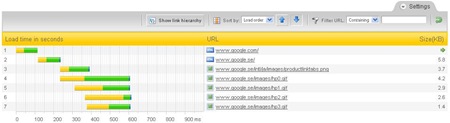
PINGDOM is one of the best website monitoring services. In addition to the monitoring, it offers a free online tool to test your website's load time. This tool will show you all information about a website like, the total time it takes to load the page, the total number of objects loaded, time taken by every element of the page. The loadtime will be shown visually with time bars.

google-loadtime-screenshot

The Full Page Test loads a complete HTML page including all objects (images, CSS, JavaScript's, RSS, Flash and frames/iframes). It mimics the way a page is loaded in a web browser.

Recently, one of their users gave a smart suggestion to them to make a bookmarklet for this tool. They created the following bookmark for webmasters who want to test and analyze the load time of any web page they are visiting.

Analyze load time

Simply drag the above link to your browser's favourites/bookmarks toolbar, so you will have a button and then you can test any web page load time instantly.

Saturday, July 12, 2008

New Feature: Embedded Comment Form in Blogger Blog

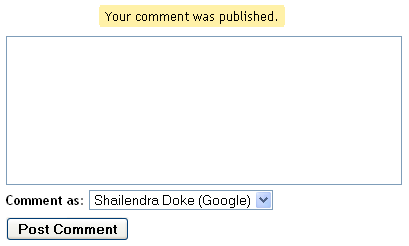
blogger comment form

Finally Blogger.com added the most most awaited feature in their blogging platform that is "Embedded Comment Form" like WordPress blogs. In the old comment system, the comment form was on a separate page so the commenter have to click the Post a Comment link to get to the form, causing for low comments. Most Blogspot Blogger's were complaining about this. Now with the new feature of “Embedded Comment Form” you can put the form at bottom of the post.


How to Embedded Comment Form

1) First you have to login to your Blogger.com account through http://draft.blogger.com/. To Enable this Comment Form you must have to login through http://draft.blogger.com/.

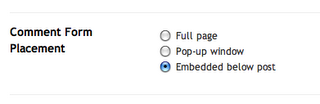
2) Choose your blog and Goto Settings >> Comments. Search for the "Comment Form Placement" setting and set the option to "Embedded Below Post" and Save Your Settings.

comment-form-placement

3) Now you should see a comment form below your post. If you don't see the comment form then read the information below very carefully.


Do you use Customized Template?

If you use customized or modified template then you need to replace some HTML code lines in your blog template to display this Comment Form on your blog. Just go through the following steps and you will find a new Comment Form below your post.

1) Go to your blogs Dashboard then go to Layout >> Edit HTML. Before editing the HTML just Backup your template so if you do any mistake, you won't loose anything.

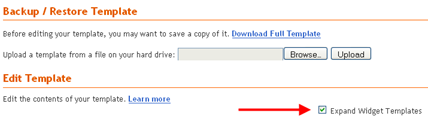
2) Tick the Expand Widget Template option.

Expand Widget

3) Find the Following code in the Template Editor. If you have difficulty finding the code, just search for postCommentMsg from your browsers search option.

<p class='comment-footer'> <b:if cond='data:post.allowComments'> <a expr:href='data:post.addCommentUrl' expr:onclick='data:post.addCommentOnclick'><data:postCommentMsg/></a> </b:if> </p>

4) If you found the above code then Replace it with the following code and Save Your Template.

<p class='comment-footer'> <b:if cond='data:post.embedCommentForm'> <b:include data='post' name='comment-form'/> <b:else/> <b:if cond='data:post.allowComments'> <a expr:href='data:post.addCommentUrl' expr:onclick='data:post.addCommentOnclick'><data:postCommentMsg/></a> </b:if> </b:if> </p>

Just go and check your blog’s post page, You will find a New Comment Form Embedded in the blog. You can see the form in action below this post and comment if you like this post or have question or difficulties implementing it in your blog.

With the comment form you can comment with Google Account, LiveJournal, WordPress, TypePad, OpenID, AIM, Name/URL, Anonymous. Though the form doesn’t look like professional one, but it is very useful feature for Blogger's.

What other blogger's say about this feature, Amanda from bloggerbuster.com and Jacky from jackbook.com.

Monday, June 30, 2008

Create Disposable Web Notes That Disappear After Being Read

Want to share any secret message with someone? Here comes privnote to help!

privnote (Private Note)

Privnote is a web service that can be used to send Private Notes over the Internet. This is very useful for sending secret messages that self-destruct or becomes unavailable as soon as they are read.

How to use privnote?

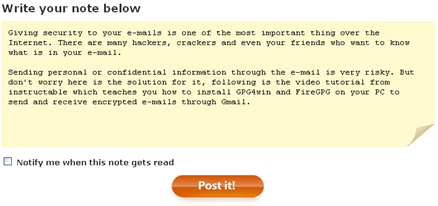
Simple, head over to privnote and type your secret message in the space provided and you will be given a link, you can send this link via e-mail, IM to whom you want to show the secret message, once the link is clicked the message is destroyed so it can only be seen once.

This service has a read receipt option also, if you check the notify option then you will be notified as soon as your message gets read by the recipient. If you send a note and suddenly regret having done so, you can click the link yourself which will destroy the note and prevent the receiver to read it. [Thanks to Digital Inspiration]

privnote.com

Friday, June 27, 2008

E-mail Encryption using Gmail, Firefox and Windows

Giving security to your e-mails is one of the most important thing over the Internet. There are many hackers, crackers and even your friends who want to know what is in your e-mail. Sending personal or confidential information through the e-mail is very risky. But don't worry here is the solution for it, following is the video tutorial from instructable which teaches you how to install GPG4win and FireGPG on your PC to send and receive encrypted e-mails through Gmail. [instructable]


Send and Receive Encrypted E-mail in Gmail - video powered by Metacafe

How to Solve a Maze with Photoshop

cake-maze-solved

Justin Mason of taint.org found a very nice and secret way to solve a maze with the help of Adobe Photoshop. It takes just 2 minutes. Wow!

Thursday, June 26, 2008

30 useful Yahoo! Mail Keyboard Shortcuts

Yahoo Mail Following is the list of keyboard shortcuts for Yahoo! Mail. For making your emailing experience better Yahoo! provides you the interface to Yahoo! Mail with Keyboard also. With the help of following Yahoo! Mail Keyboard Shortcuts you will reduce your trips to the mouse and can reduce the pain (future problems) of your hand which are being caused by mouse.


Yahoo! Mail Keyboard Shortcuts

  Key For the Task
  m Check Mail
  Shift+m Check All Mail
  Ctrl+\ Close Current Tab
  n Write New Message
  r Reply
  a Reply All
  f Forward Message
  k Mark As Read
  Shift+k Mark As Unread
  l (L) Flag
  Shift+l (L) Clear Flag
  del Delete Item
  p Print
  Ctrl+s Save Draft
  Ctrl+Enter Send Message
  v Turn Reading Pane On/Off
  Ctrl+[ Navigate Through Tabs - Leftwards
  Ctrl+] Navigate Through Tabs - Rightwards
  Enter Select Message and Press Enter to Open it in its own tab
  Enter Select Contact and Press Enter to Edit Contact
  Ctrl+f Find Word or Phrase in Message
  F11 Expand Window to its Max Height
  Ctrl+.(period) Next Message (In Message Tab)
  Ctrl+, Previous Message (In Message Tab)
  Ctrl+Shift+End Skip to Oldest Unread Message
  d Move Message to a Folder (Dropdown List of Folder Name)
  Esc Close Read-Message Tab
  c Start a New Chat

Make your experience more better with these Yahoo! Mail Keyboard Shortcuts and if you know more Yahoo! Mail shortcuts or have doubt in these shortcuts, please add them in the comments below.

Hope you enjoy it!

Saturday, June 21, 2008

Yahoo: New Ymail.com extension

Yahoo launched its two new domains for free email services, the domains are Ymail.com and Rocketmail.com. If you missed your name in yahoo.com email service then you can register your email address with your name on Ymail.com or Rocketmail.com. Don't worry you will get the same features as you would with mail.yahoo.com.

You can register new Ymail.com or Rocketmail.com account from default mail.yahoo.com. Fill up the form and choose the extension you like Ymail.com or Rocketmail.com.

It sounds too close to Gmail.com as Ymail.com! Isn't it?

Friday, June 20, 2008

New 728x90 Payperpost banner! Payperpost support is very helpful!

As you know that in PayPerPost affiliate section there are only four types of banners and they are (125x125) (200x125) (145x100) (88x31). I was having a 728x90 free space below the logo in my blog template for advertising. I decided to fill it with some affiliate ads so I selected Payperpost and created a 728x90 custom banner to use on my blog. You can see the banner below.

ppp_banner

On Friday I sent an email with a link to my banner to Payperpost support regarding permission to use the new 728x90 custom banner which I created to fit in my new blog design. Though the custom banner was not so attractive but for a short time I decided use it. After 2-3 days I got an email from the Payperpost team in which they said that they have created a new 728x90 banner and it will be forwarded to me.

Here is the Payperpost Customer Love email.

We have solved your issue

Hi,

I apologize for not getting back to you sooner, as I was out of town.

I will forward you an e-mail with a banner add that we created.  Please feel free to use this banner.

Thank you,

Gordon

After few minutes I got an email containing a new 728x90 banner from Gordon King the Manager of Customer Love, Payperpost. Here is the new banner.

ppp_leader

The banner is really attractive, isn’t it? Use this banner to maximize your affiliate earnings. Download the banner by clicking on it and upload it to your hosting service.

All I want to say about PayPerPost is they are prompt and very helpful, Thank You PPP.

Wednesday, May 28, 2008

How the Browser Sees Google

“Reflow is the process by which the geometry of the layout engine’s formatting objects are computed,” Doug T. explains. Above Mozilla reflow visualization shows how the browser calculates the geometry of the Google Japan homepage, and Doug has more visualizations at his blog. [Via Blogoscoped.]

Thursday, May 22, 2008

You can Turn Room Lights On and Off with Twitter

Yes, you read it right, you can Turn Room Lights On and Off with Twitter a popular social networking site. Justin Wickett found this another way to make use of twitter. His goal was to turn lights on and off remotely via cell phone text messaging. He used Bob Paauwe's iLink INSTEON software as well as twitter to network his cell phone with his house's electrical system.


Control Lights with Twitter from Justin Wickett on Vimeo.

Microsoft Released - Windows Feature Comparison (XP vs Vista)

microsoft-logo No more wondering about what new features Vista SP1 got. Microsoft just released the Windows Feature Comparison (The White Paper). It is a pdf file which helps you to compare the features of Windows OS. You can check the capabilities of Windows XP with SP3 and Windows Vista with SP1. Capabilities like security, management, deployment, mobility, and productivity.
Download

Windows Feature Comparison

Tuesday, May 20, 2008

Wrist Tracker with integrated GPS and GSM modules

This device is a Cell Phone + GPS tracker + GPS datalogger + watch. This multifunctional device can be used for live tracking as it has GPS and GSM modules complete with a high performance antenna. System settings of this wrist tracker can be configured via SMS or USB.

phone-gps-watch

It has a LCD display which can show a variety of information such as system setting, your current coordination data and satellite indicator among others. It has a special facility to transmit your location as both longitude and latitude coordinates to your cell phone via SMS and can also be tracked online live by GPRS. Price info not available. [ via coolest-gadgets]

Monday, May 19, 2008

Windows Vista Skin for iPhone

iphone vista VistaPerfection 2.0 is a complete Windows Vista skin for the iPhone. This theme is created by Spec Works (MMi forum member ebl4287). It gives you environment feel like using a PC. This theme comes with many elements like -

  • Over 90 icons
  • Dock
  • WiFi icon
  • Boot and restore images
  • Sliders
  • Edge icon
  • Vista login/logoff (unlock/lock) sound scheme

If you want to change the look of your iPhone, goto ModMyiFone and follow the instructions.

iphone_vista_2

Remember, VistaPerfection is not on Installer just yet, you will need to follow the instruction given HERE.

[via Just Another iPhone Blog via Technabob]

Friday, May 9, 2008

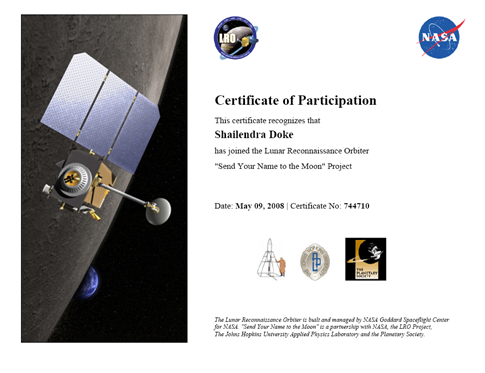
Send Your Name to the Moon

NASA is going to launch an unmanned spacecraft Lunar Reconnaissance Orbiter to the Moon in late 2008. The objective is to find safe landing sites, locate potential resources, characterize the radiation environment, and demonstrate new technology.

Show your support for this mission by giving your name. Names will be collected and placed onboard the LRO spacecraft for its historic mission bringing NASA back to the moon. You will also receive a certificate showcasing your support of the mission.

LRO_NASA_Certificate

It is the golden opportunity to send your name to the moon, Sign up to send your name to the moon. The deadline is June 27, 2008 for the submission of names.
Thanks to Amit Agarwal.

Friday, May 2, 2008

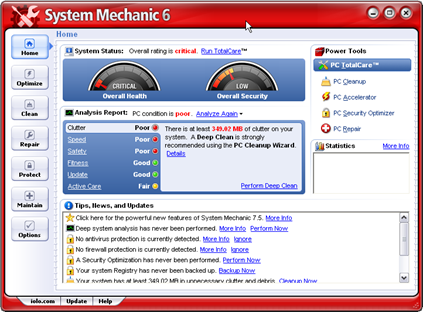
Get a Free Licence code of iolo System Mechanic - Download Now!

The System Mechanic is one of the most popular PC tuning software's. It makes your old PC run like new. It automatically repairs errors and fragmentation, cleans out clutter, and tunes up your PC so that it runs smoothly, reliably, and up to 300% faster!

iolo System Mechanic

Features of System Mechanic

  • Remove junk files and folders and duplicate files
  • Protect against security vulnerabilities
  • Protect your privacy
  • Stop popups
  • Block online advertisements (Internet Explorer, version 5.01 and later)
  • Clean your system registry
  • Fix or remove broken shortcuts
  • Uninstall or relocate software
  • Get rid of old uninstaller links
  • Recover deleted data
  • Perform routine PC maintenance through a wizard or a scheduler
  • Optimize your Internet performance
  • Manage your system startup
  • Customize Windows
  • Speed up your hard drives
  • Manage your memory
  • Track system changes
  • Remove parasites including spyware, adware, and keyboard loggers

How to Get a Free System Mechanic License code

  • Visit this page and click the Continue button.
  • You will see a page with the Item Code, Description, quantity etc. It will show you the order total $0.00. Click the Secure Checkout button.
  • Fill the form, make sure to use a real email address, you will get the licence code via email. Click Continue button.
  • Make sure Email Delivery is selected. Click Continue button.
  • It will show you the Review Order page. Click the Place Order button.
  • Here you will get a Thank You page showing your order number.
  • Download the System Mechanic if you have not Downloaded it.
  • Check your email, get the licence key and enter it in the software.

The Licence you get is valid only for one year.

Thanks to Raymond who found this fantastic offer and shared with us.

Wednesday, April 30, 2008

Edit your Gmail contacts directly from your Chat List

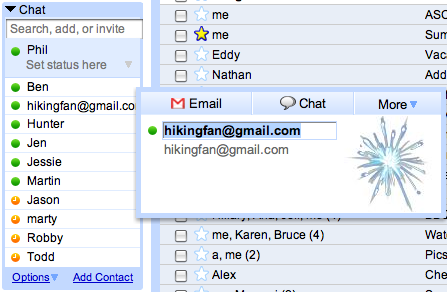
It happens sometimes that when you add a new friend to the Gmail chat, email address is added as their contact name, such as hikingfan@gmail.com. Everyone wants to display names of their friends in the chat list so you will never be confused as to who's who. The only way to change this, people used to go to contacts, select contact profile, add the name of the friend, and then save it.

Now with the new version of Gmail (launched for Firefox 2 and IE7) you can correct the above problem by editing your Gmail contacts directly from the chat list. You just need to hover your mouse pointer over one of the contact, you will get a pop-up with the contacts details. If you click on the contact name, it will automatically become an editable field. Now simply type the desired name and hit "enter". Your changes will save the name in your chat list as well as in your contacts.

chat-edit

[Gmail Blog]

Thursday, April 24, 2008

I signed up for Pay Per Post

Many of my friends told me about Pay Per Post. So I searched some information about it and I found Pay Per Post is a much popular market place where Bloggers like me can get paid for giving their opinions about advertisers product and doing some blog reviews.

I joined pay per post and I want to share a little bit about it with you. Many of you might be knowing about it but for those who don't, Pay Per Post is a blog advertising network or we can say an online marketplace where it connects Bloggers with the Advertisers.

Here is what they say about Bloggers
"Get paid for blogging. You've been writing about Web sites, products, services and companies you love for years and you have yet to benefit from all the sales and traffic you have helped generate. That's about to change. With PayPerPost advertisers are willing to pay you for your opinion on various topics. Search through a list of Opportunities, make a blog posting, get your content approved, and get paid. It's that simple. "

After signing up for Pay Per Post you will have to submit your blog for review. They will review your blog and if approved then you can go further to make some money. My blog is approved and they paid me $20 dollar for writing about them. Do you know that some popular Bloggers are being offered upto $2500 for a single review. Isn't it cool.

I started my blogging on this free Blogger platform and with the money which I will earn from pay per post I will buy one or two domains and hosting (I have not planned yet, but there is a thought somewhere in my mind).

Sunday, April 20, 2008

Its Good to Learn another Language

This is a commercial advertisement from a language school AVISTA. Language is a very essential part of our life ( or body?). Its always Good to Learn another Language.

Why to learn another language.

  • The main communication medium in our life is our Language.
  • As you can see in the above funny video, language can save your life. In my opinion just try to learn to shout "HELP" in as much as language's you can. Who knows when you need that word.
  • You can get knowledge more than your expectation by learning another language.
  • You can expand your business worldwide and understand one's culture.

If you are not satisfied with these reasons then you must see 10 good reasons why you should be learning a foreign language.

Saturday, April 19, 2008

A Dirty Little Secret about Inject Printers

"Who knew what was going on inside inkjet printers? Yikes. A lot of that ink, which costs three times more per milliliter than a $350 bottle of the finest Cristal champagne, is seeping into a gummy well of useless black slime. What a waste."

Metacafe via DVICE