Your Ad Here

Free Articles: Free Online Articles Directory
Automotive | Business | Computers | Entertainment | Finance | Food | Health | Home and family | Internet


Your Ad Here
Free Articles


Legal | Science | Self Improvement | Shopping | Society | Sports | Technology | Travel | Writing


http://site-free-articles.blogspot.com

Showing posts with label SEO. Show all posts

Tuesday, July 29, 2008

Test Website Load Time with One Click

To rank well on the top search engines like Google, content rich website is not enough, the website should be a fast loading website also. Webmasters can decrease their website’s load time by analyzing which elements are taking too much time to load.


How to Test Website Load Time

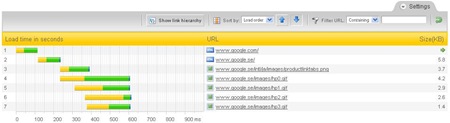
PINGDOM is one of the best website monitoring services. In addition to the monitoring, it offers a free online tool to test your website's load time. This tool will show you all information about a website like, the total time it takes to load the page, the total number of objects loaded, time taken by every element of the page. The loadtime will be shown visually with time bars.

google-loadtime-screenshot

The Full Page Test loads a complete HTML page including all objects (images, CSS, JavaScript's, RSS, Flash and frames/iframes). It mimics the way a page is loaded in a web browser.

Recently, one of their users gave a smart suggestion to them to make a bookmarklet for this tool. They created the following bookmark for webmasters who want to test and analyze the load time of any web page they are visiting.

Analyze load time

Simply drag the above link to your browser's favourites/bookmarks toolbar, so you will have a button and then you can test any web page load time instantly.

Saturday, February 10, 2007

Do you want your link listed on a website for free ?

Do you want your link to be listed on a website's homepage for free.
WriteAbout.Us is a paid and free link service, which allows you put
your website on their homepage. It is useful to increase your page rank
and get more traffic to your site. You can put your site on it for free by
writing about it on your blog or website, or buying a link on their website.

Saturday, January 20, 2007

10 Tips for External Search Engine Optimization


By: Bob Jacobsen


1. Thing to keep in mind


This is not really a tip, more a guideline, all the internal optimization is a good thing to do, but here is all the stuff that real matters, keep in minde this is about getting people to a speciffic destination, your website.


2. Adding your site to the big search engines.


This is not necessary, its is in fact a wast of time, as I have experienced. what will happen when your site is online, is you need other sites to link to you, then when google sees that, then it adds your site to its system, and bingo.


3. http://dmoz.org/


A good thing to do is to add your site to dmoz.org, aka. open directory project. I recently found that I have a website that could not get a pagerank, or it did, it had 0, the reason was that I forgot to add my site to dmoz.org, for some reason that helped.


4. External links


Here comes the most important part of Search Engine Optimization, links!! can't be said enough, do what ever to get other sites to link to you.


5. Does bad external links exist?


No, not really, you can get irrelevant links, (people with a totally different subject) to link to you, but that does not matter, what could be bad is linkback, many places you make a deal with another webmaster to swap links, and if you have a nice product, lets say you sell SEO optimization tools, and then you swap links with an adult website, this could end up bad, cause google can see that link and may think that your site is also relevant to adult content, this is not recommented.


6. Getting links 1


One thing is that you could send out a request to other webmasters by email, trying to se if he/she would be interested in swapping links with your, but sending out 1000 email could get tough, so you could download my program 'Mass-email-sender' , its free to use.


7. Getting links 2


You could add your site to as many search engines and directories as possible, also hard work, can take a lot of time, I have a solution for this also, and yes its also free to use as much you'd like.


8. Getting links 3


An offencive approch could be to look at your competitors, to analyse stuff like, who is linking to them?, what makes them rank high in google? try looking in the tools section


9. Do not participate in link farms or link exchange programs.


Search engines consider link farms and link exchange programs as spam, as they have only one purpose - to artificially inflate a site's link popularity, by exchanging links with other participants.


10. Some personale words before you go on optimizing.


While reading all these theory about getting visitors to your site, have your even thougth about how to keep your visitors?, or to make them come back? did you know that most of the visitors from google are just 'suft through' visitors, which means they look at your site for a few seconds, and if it is not interesing they go to the next site. what I'm meaing to say is, be carefull many people makes mistakes by only thinking 'what does google want?' instead of 'what does my audience want? so make content for your visitors and only keep in mind optimization is a good thing.


The end.


This article was was a very shallow overview of the more important tips, stay tuned for my more indept articles on how to make websites link to you.


Source: Free Articles from ArticlesBase.com


About the Author:


Check out my SEO site - Free online marketing and seo tools and articles

Wednesday, January 17, 2007

How To Get Your Blog Site Feed Listed In Yahoo! And MSN Within Hours, Is Easier Than You Think

BLOGS... they seem to be the talk of the Internet marketing
world these days, and for good reason.

Not only do the Search Engines love them for there Content
Rich pages, you also have the ability to plug your Blogs "Site Feed"
into an RSS feed and then have it syndicated to thousands of websites
and directories giving your content more exposure to your target audience.

RSS(Real Simple Syndication) is a very Powerful technology that has
been around for quite some time and when used correctly, can build an
audience overnight.

If you want a crash course on what RSS is, in more depth, since the
nature of this article is to show you how to get your Blogs "Site Feed"
listed in Yahoo! and MSN, I've provided a link to a page full of articles
on RSS related issues.http://www.rss-specifications.com/rss-articles.htm

Now, depending on where your Blog is hosted, whether its through a
free service like Blogger.com -- http://www.blogger.com or hosted on
your websites server you should have a "Site Feed URL" that has the
.XML extension.

This is your "Site Feed URL".

You'll usually locate it within your Settings area of Blog control center.

Here's what mine looks like as an example:
http://theiwe.blogspot.com/atom.xml

This URL is intended for a RSS News Reader, so disregard
its appearance.

Once you find your "Site Feed URL", copy and paste it into
Notepad because you'll need it for the next steps coming ahead.

Now, what you need to do is go and set-up an My Yahoo! and
My MSN account. I've provided the links for you below.

- My Yahoo! ==> http://my.yahoo.com

- My MSN ==> http://msn.com

It should only take you about 15-20 minutes at the most.

If you already have accounts with My Yahoo! and My MSN,
read on.

This is assuming you already have your accounts set-up,
so your next step is to Login to your My Yahoo! account.

When you login, you'll be taken to your Yahoo! page immediately.

What you want to do next is go look under the Yahoo! search
box to the left and click on the "Add Content" link.

This will bring you to a new page.

From there, over to the right by the "Find" button you'll see an
"Add RSS by URL" link, click on it.

A new window will open with a "Web Form". Simply copy and
paste your "Site Feed URL" from Notepad into the web form
and click on the "Add" button.

Now, you should see your Blogs name infront of you. Simply
click on the yellow "Add To My Yahoo!" button and your feed
will be added.

The next thing you should see is your "Site Feed" with your
"Headlines".

Click on one of them, it should take you to your Blog, to the
desired Headline you chose.

Your My Yahoo! page should Now have your Blogs "Site Feed"
Headlines listed at the bottom.

Scroll down to check. If you don't see them, it sometimes takes
up to 24-48 hours for them to appear, so just check back later.

Now that thats done, everytime you update your Blog with NEW content,
it'll "Automatically" update on your My Yahoo! page and everybody else's
pages who have subscribe to your feed, plus, within 24-48 hours your
feed will get Spidered and Indexed by Yahoo!.

Talk about getting the word out in a HURRY with very little effort on your part.

This is "Viral Marketing" at its Best in my mind.

And... it's so simple to implement.

Okay.

Now it's time to do the same to your My MSN account as what you
did above to your My Yahoo! page.

Here's the link to go login(click on Sign In from main page):
http://www.msn.com

Once your login to your My MSN account you should see an
"Add Content" link under the MSN logo to your left. Click on it.

A pop-up should now be displaying. Simply copy and paste
your "Site Feed URL" from your Notepad into the web form
provided and click the Search button(the green button with the arrow).

You should now be looking at Check Box with your Blogs name
beside it. Check off your "Site Feed URL" and then press the
OK button at the bottom.

PRESTO! Like magic... your Blogs site feed has now been added
to your My MSN page which will then be spidered in the next
24-48 hours and Indexed by MSN.

That's the Power of BLOGS(Web-Logs) and RSS(Real Simple Syndication)
combined with two Internet giants.

The only thing you have to bring to the table IS, fresh, quality
content that your audience WANTS, and do it on a regular basis.

I post my articles that I write on a weekly basis, making my Blog called...
The Internet Wonders Blog - http://theiwe.blogspot.com - a search engine Magnet!

You can do the same because I just showed you HOW.

In conclusion, creating BLOGS and using RSS as a vehicle to
syndicate your Blogs content is a Sure-Fire way to get your
content spidered more frequently by search engines and the
exposure it deserves, which in turn, will build you a large
audience of buying customers that TRUST you.

About the Author: Want to get MORE 'Insider' marketing Secrets
on How-To drive HUGE amounts of Laser Targeted Traffic to your website?
Then you need to subscribe to Cory Threlfall's ezine called... The Internet Wonders eZine
at --
http://www.internetwondersezine.com