Your Ad Here

Free Articles: Free Online Articles Directory
Automotive | Business | Computers | Entertainment | Finance | Food | Health | Home and family | Internet


Your Ad Here
Free Articles


Legal | Science | Self Improvement | Shopping | Society | Sports | Technology | Travel | Writing


http://site-free-articles.blogspot.com

Showing posts with label Firefox. Show all posts

Friday, June 27, 2008

E-mail Encryption using Gmail, Firefox and Windows

Giving security to your e-mails is one of the most important thing over the Internet. There are many hackers, crackers and even your friends who want to know what is in your e-mail. Sending personal or confidential information through the e-mail is very risky. But don't worry here is the solution for it, following is the video tutorial from instructable which teaches you how to install GPG4win and FireGPG on your PC to send and receive encrypted e-mails through Gmail. [instructable]


Send and Receive Encrypted E-mail in Gmail - video powered by Metacafe

Wednesday, June 18, 2008

Get a Guinness World Record Certificate for Firefox 3

You can get yourself a Guinness World Record Certificate for helping Firefox by downloading Firefox 3 Today. If you have already downloaded it then you can get your Firefox 3 Download Day Certificate. Here’s my Certificate.

Firefox Certificate 

Download Your Certificate from spreadfirefox.com

Wednesday, April 9, 2008

Tab Effect: Give a 3D Flipping Tab Effect in Firefox

Tab Effect

Tab Effect is a Mozilla Firefox add-on, which adds a 3D cube rotation effect when you flip or change the Tabs. This extension uses DirectX 8 to create the 3D Cube rotation effect while switching the tabs.

This add-on is good to impress your friends. But Not that much important for a geek as it slows down your browsing speed. I used it for a while and got bored then removed it.

Download Tab Effect

Wednesday, April 2, 2008

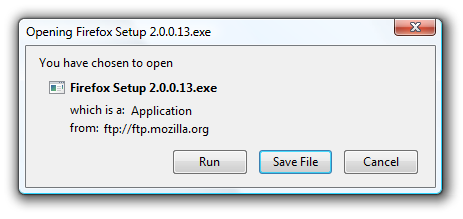
OpenDownload: Run Downloads in Firefox Instead of Saving Them

firefox-open-run-download

The difference between Internet Explorer and Firefox while downloading a file from internet is, Firefox will only let you save the file to your computer and then you have to Run it manually. Internet Explorer gives you facility to Run the file from its location (the file you run is downloaded and stored in a temporary folder). By this you will save the Hard Disk Space because the data within temporary folder will be deleted periodically. It will help when you want to use a file just once.

OpenDownlaod is a extension Firefox which adds a Run option like IE in Firefox download dialog box. When you select the Run option, it will download the file to your temporary directory. Then the file will run with the default application. After 24 hours the file will automatically be deleted from your system.

[via CyberNet]

Friday, March 28, 2008

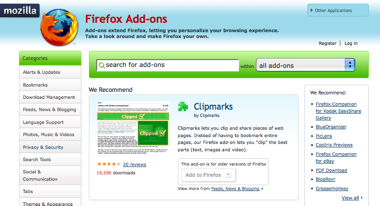
The Redesigned Mozilla Add-ons website is now Live!

Great news from Basil Hashem, Mike Morgan and Madhava Enros: the refreshed, redesigned and ready for interaction Mozilla Add-ons web site is now live!

Mozilla

Here’s what Basil had to say:

The AMO team has been hard at work for the last many months on a major site redesign and is pleased to announce the availability of the new AMO site. This is a significant release and chock-full of goodies for end users and add-on authors alike. The focus has been predominantly to provide a visual refresh, simplify navigation and rework the add-on developer tools area. But that doesn’t quite capture just how much effort has gone into this release. So, here is a full rundown of all the changes.

The site that’s served over 600 million add-on downloads is now even more useful for more people than ever before.

[Mozilla Blog]

Sunday, March 16, 2008

Access hidden Firefox settings with Configuration Mania

configuration-mania

Mozilla hides some of the options provided to users, to access these option user have to type about:config in the address bar. Many users don't even know about about:config, and once you discover it, it's still not clear what all of the settings do.

Configuration Mania is a Firefox add-on that organizes and displays many of the options which are normally only available through about:config. Here are just a few things you can manipulate with Configuration Mania.

  • Location bar auto-complete behavior
  • Default domain guessing behavior (should Firefox add www or .com when you type a word into the location bar?)
  • Tab behavior (where to display the close button, default tab width, etc)
  • Hide the Go button next to location bar
  • Change your user agent
  • Adjust cache settings

Configuration Mania is available for both Firefox 2 and Firefox 3 beta.

[via: DownloadSquad]