

Showing posts with label Apple. Show all posts
Showing posts with label Apple. Show all posts
Monday, April 5, 2010

Thursday, July 3, 2008
Macbook Air Keyboard on the iPhone

Bored with the default keyboard layout of your iPhone, try this MacBook Air's keyboard mod. It is very simple to install, the package install directly from Installer.app. It will change your iPhone’s (boring) default keyboard layout to MacBook Air keyboard layout.
It will not affect your typing performance in any way-unless of course you type faster when you see black plastic. Want it? You might have to add this repository ( http://planet-iphones.com/repository/ ) first. [via Gizmodo]
Monday, May 19, 2008
Windows Vista Skin for iPhone
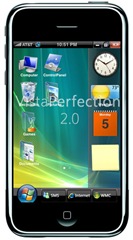 VistaPerfection 2.0 is a complete Windows Vista skin for the iPhone. This theme is created by Spec Works (MMi forum member ebl4287). It gives you environment feel like using a PC. This theme comes with many elements like -
- Over 90 icons
- Dock
- WiFi icon
- Boot and restore images
- Sliders
- Edge icon
- Vista login/logoff (unlock/lock) sound scheme
If you want to change the look of your iPhone, goto ModMyiFone and follow the instructions.

Remember, VistaPerfection is not on Installer just yet, you will need to follow the instruction given HERE.
[via Just Another iPhone Blog via Technabob]
Monday, April 21, 2008
Apple like interface for Google Image Search
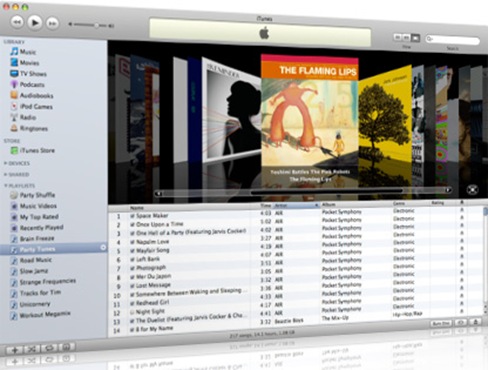
Everyone likes the Apple's interface for scrolling through albums visually with a scrollbar. You will find the same interface for scrolling through websites on SearchMe.
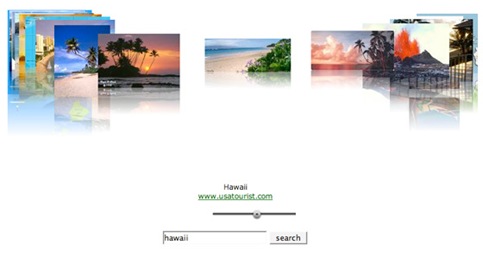
Now you can browse Google Images like scrolling through albums on Apple. An Austrian developer named Franz Enzenhofer has built his own interface to Google Image Search named CreativeSpace. This interface is built with Ajax. You can also set the safe search to on/off.
Tuesday, April 15, 2008
Latest iPhone Firmware lets users save pictures in Safari
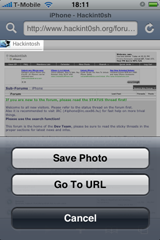
A good news for all iPhone users, now you can save pictures directly from Safari Browser and into the Photo Album. The latest beta version of Apple's iPhone 1.2.0 firmware gives you the possibility of saving pictures straight from Safari. You just have to hold your finger against an image for a longer time than usual and the popup dialog will appear.
[via Gizmodo]
Monday, March 24, 2008
OS X turns VII
"A lot can change in just a few years: take OS X, for example. On March 24, 2001, Apple released OS X 10.0, code-named Cheetah. It was the first ground-up overhaul of the Mac OS since its introduction in 1984, and it brought with it design changes that would shake the platform for years to come: BSD-based underpinnings, true preemptive multitasking, and, of course, the Aqua interface. Not only did it usher in the era of computing in which we now live, but it brought Apple along for the ride." - Read Full on Macworld
Subscribe to:
Posts (Atom)